

Morse Code Translator
Translate text to Morse code and Morse code to text, then play it as sound or download a WAV file.
Type in either panel. The other one updates as you go.
Settings
Flash
Use the bolt button in the playback dock. It pulses the dock's border only — never the page — in time with the signal. Not suitable for people sensitive to flashing lights.
Not supported on this device (iPhone and most desktop browsers do not support it).
Audio
Waveform applies to CW tone only.
Reference
Audio
No sound on iPhone? Turn off silent mode.
A Brief Origin of Morse Code
In the 1830s, Samuel Morse and his colleague Alfred Vail took initiative about Morse code for electric telegraph and developed a proper system of dots and dashes in 1837 and finally revealed it publicly in 1838. In 1844, Samuel Morse sent the famous message “What hath God wrought?” from Washington, D.C. to Baltimore, over a new telegraph line. Without computer technology, people used to send and receive these codes by hand in the form of letters and numbers.
Morse code crossed the Atlantic Ocean in 1866 and SOS was adopted as
the international distress signal in 1906. Fun fact: SOS does not stand for any words. It was chosen because ... --- ... is simple and easy to recognize. Morse code was used in emergency
situations when there was no internet available. It was widely used for telegram and radio signals.
Nowadays, you can still find Morse code in ham radio, in aviation beacons, and in tools that help people to communicate who have some disabilities. The dots and dashes of Morse code are also used for troubleshooting micro electronic systems having just one LED or button. You can spot Morse code in escape room puzzles, movies, bracelets and necklaces, and even tattoos.
About Morse Code Translator
A Morse Code Translator is an online Morse code converter that turns simple text into Morse code — dots and dashes. In Morse code, short beeps are known as dots (“dits”) and long beeps are called dashes (“dahs”). You can also convert Morse code back into simple English text, which means a message can be coded and decoded with a few easy steps with a Morse code translator.
In Morse code, there is a unique sequence of dots and dashes for every letter, number and punctuation. Characters
within a word are separated by a single space while two words are separated by a slash (/). So HELLO is .... . .-.. .-.. ---, and HELLO WORLD is .... . .-.. .-.. --- / .-- --- .-. .-.. -..
Our Morse code translator works both ways, converting plain text into Morse code and translating Morse code back into simple text. This tool can play Morse code out loud with the correct timing. A dash is three times longer than a dot, and there are proper pauses between letters and words, so you can easily learn to recognize Morse by listening. It all works inside your browser locally, so nothing leaves your device.
How to Use Our Morse Code Translator
It takes only a few seconds. Here is how to convert text to Morse code and Morse code to text.
-
Choose your direction.
Choose Text to Morse to convert words into dots and dashes, or Morse to Text to decode Morse code back into English.
-
Type your message.
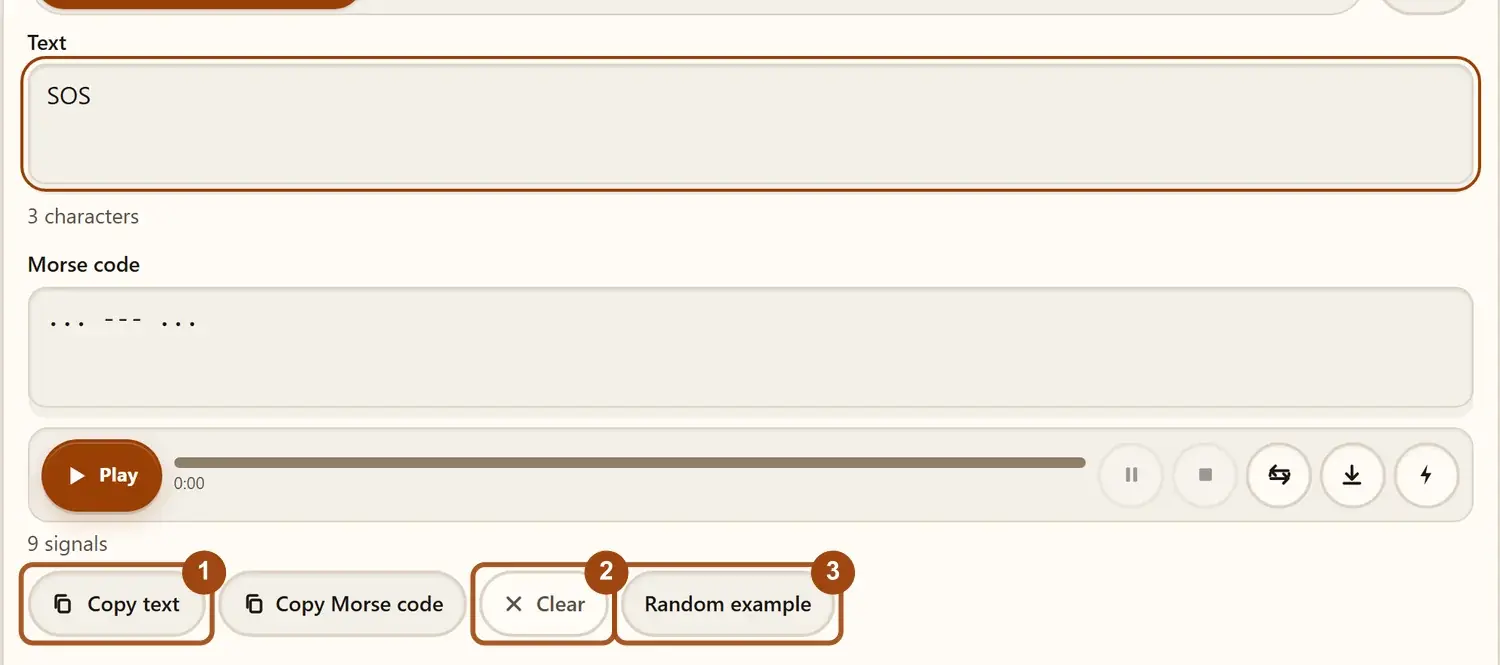
Type your message, or paste your Morse code. Always use a space between letters and a slash (/) between words.
-
Read the result.
Your translation shows up instantly. For example, HELLO WORLD becomes:
.... . .-.. .-.. --- / .-- --- .-. .-.. -.. -
Play the sound.
Press play to hear your message as short and long beeps. It’s the best way to get used to the rhythm of Morse code.
-
Copy or swap.
With one click you can copy the result, or swap the input and output to translate it back the other way.
How to Learn Morse Code Step by Step
There is no need to memorize a chart to learn Morse code. The best way is to learn it as sound and rhythm, not as a picture of dots and dashes.
Step 1: Understand the timing
Morse code is built on one simple unit, the length of a dot.
- A dash is 3 units long.
- The gap between parts of a letter is 1 unit.
- The gap between letters is 3 units.
- The gap between words is 7 units.
Once you learn and memorize this, every message makes sense.
Step 2: Start with two letters
Begin with E (.) and T (-). These two are the shortest
letters in Morse code, so they explain to you the difference between short and long without any confusion.
Step 3: Add letters slowly
Instead of learning the whole alphabet at once, always add a few new letters at a time.
- A (
.-) and N (-.) are mirror images of each other. - I (
..) and M (--) are easy to hear and remember.
When you start recognizing old letters without thinking, then you can add new letters.
Step 4: Learn by listening
Before looking at the dots and dashes of each letter in Morse code, always listen to each and every letter by using the play button. There is a method called the Koch method; many beginners use this to train their ears to recognize whole letters instead of counting beeps. Practicing 10 minutes a day is better than one long session a week.
Step 5: Practice with short words
Once you know a few letters, try simple words:
- HI is
.... .. - NO is
-. --- - YES is
-.-- . ... - SOS is
... --- ...
Step 6: Decode by ear
Type a short word, press play without looking at the result, and write down what you hear. Then check your answer with the translator. Over time, move on to longer words and full sentences.
How to Encode and Decode Morse Code
You can translate Morse code by hand, even without a tool. It works in two simple steps.
Encode: turn words into Morse
Pick a short word, like HELLO.
Write the Morse code for each letter:
- H =
.... - E =
. - L =
.-.. - L =
.-.. - O =
---
Put one space between letters: .... . .-.. .-.. ---
If your message has more than one word, put a slash (/) between the words.
Decode: turn Morse back into words
Split the message at each space. Every chunk is one letter.
Match each chunk to its letter.
Read the letters in order. A slash means a new word begins.
For example, .... .. splits into .... (H) and .. (I), so the message says HI.
Why Spacing Matters in Morse Code
Morse code is easy to misread without spaces. Look at these two examples below:
.- -.is AN (the letters A and N)..- / -.is A N (two separate words).
When the gaps are changed, even the same dots and dashes meaning get different:
.-is the letter A.. -(with a space) are the two letters E and T.
That is why every letter needs a space after it, and every word needs a slash. Not every tool uses the same word separator, so some use a slash (/), a vertical bar (|), or extra spaces. The main rule is to pick one style and use it the same way throughout your message.
Here are a few more examples of letters to practice:
| Letter | Morse code |
|---|---|
| D | -.. |
| G | --. |
| H | .... |
| K | -.- |
| R | .-. |
| U | ..- |
Avoid symbols that have no Morse code. Morse code covers letters, numbers, and common punctuation, but not emojis or rare symbols. If your message includes them, the translator may show a # in their place. Replace them with plain letters or words before you translate.
Try it with a flashlight
A flashlight or your phone’s torch is enough to practice.
- Short flash = dot
- Long flash (about three times longer) = dash
- Short pause between letters, longer pause between words
Start with SOS (... --- ...): three short flashes, three long flashes, three short
flashes. Practice with a friend who is learning too, and never point the light at people’s eyes or at traffic.
Common Morse Code Messages
Try typing, tapping, or flashing these:
| Message | Morse code |
|---|---|
| OK | --- -.- |
| LOVE | .-.. --- ...- . |
| HELP ME | .... . .-.. .--. / -- . |
| THANKS | - .... .- -. -.- ... |
| THANK YOU | - .... .- -. -.- / -.-- --- ..- |
| I LOVE YOU | .. / .-.. --- ...- . / -.-- --- ..- |
| I MISS YOU | .. / -- .. ... ... / -.-- --- ..- |
| SOS | ... --- ... |
| GOOD MORNING | --. --- --- -.. / -- --- .-. -. .. -. --. |
Try These Examples in the Translator
-
Encode a phrase. Choose Text to Morse and type GOOD MORNING. You should get:
--. --- --- -.. / -- --- .-. -. .. -. --. -
Decode a word. Switch to Morse to Text and paste this:
-- --- .-. ... .It decodes to MORSE. - Break it on purpose. Remove one space from the Morse above and see how the result changes. This shows why every letter needs its own gap.
Morse Code Timing Explained: Dots, Dashes & Gaps
How Morse Code Timing Works
Morse code has no letters or sounds of its own. It is built from short and long signals, and everything is measured against one unit of time: the length of a dot.
| Part | Length | Example |
|---|---|---|
| Dot | 1 unit | . |
| Dash | 3 units | - |
| Gap inside a letter | 1 unit | Between the dot and dash in A (.-) |
| Gap between letters | 3 units | Between A and B |
| Gap between words | 7 units | Between HELLO and WORLD |
Using this table, the letter A (.-) takes 5 units: one for the dot, one for the gap, and three for the dash.
How speed is measured
Morse speed is counted in words per minute (WPM). Because words have different lengths, operators use one test word, PARIS. It takes exactly 50 units to send, including the pause after it. To find how long one dot lasts, divide 1,200 by your speed.
Beginners usually start slow and speed up as their ear improves.
International and American Morse
The code used today is International Morse code, the standard set by the ITU (ITU-R M.1677). An older version, American Morse code, was used on U.S. telegraph lines and has some different letters and spacing.
What Does Morse Code Sound Like?
Each letter has its own rhythm, a bit like a tiny tune.
| Letter | How it sounds |
|---|---|
| E | dit |
| T | dah |
| A | di-dah |
| N | dah-dit |
| S | di-di-dit |
| O | dah-dah-dah |
Put them together and you get SOS: di-di-dit, dah-dah-dah, di-di-dit. It has a short-long-short pattern that is easy to remember.
Here is HELLO as sound:
- H: di-di-di-dit
- E: dit
- L: di-dah-di-dit
- L: di-dah-di-dit
- O: dah-dah-dah
Just type HELLO in the translator, press play and follow along out loud.
Fun fact: Just by timing and rhythm, experienced operators can easily recognize who is sending a message. This is called a sender’s “fist”.
Our Morse Code Translator Features
In our Morse code translator, you can use all features like audio playback, sharing, learning etc. in one place. Here is the list below:
Text to Morse Code
Type your message into the top box and you’ll see the results in the form of dots ( . ) and dashes ( - ). If the result appears in the form of “ # “, it means your character can’t be translated. It offers all letters ( A - Z ), numbers ( 0 - 9 ) and punctuation marks.
Morse Code to Text
This online Morse code decoder turns dots and dashes into plain text. When decoding a message, type or paste every dot as ( . ) and dash as ( - ) into the top box. Always put one space between letters and put a slash ( / ) between words. You’ll see the result in the form of plain text in the output box instantly. It works for Morse that came from a flashing light, a series of beeps, or a note on paper. If you find “ # “ in the result box, it means your character can’t be translated; you can spot and fix the mistake easily.
Hear It, See It or Feel It
Use the Morse code player: press Play to hear your message as beeps, with short beeps for dots and longer ones for dashes. You can use the Pause, Stop, and Repeat button to control it. You can also choose how you want to receive the code:
- Sound: a clear beep for each dot and dash
- Light: a flashing light that matches the rhythm, like a Morse code simulator for real signal training
- Vibration: your phone buzzes in short and long pulses

Highlight Feature
Press Play and watch each letter light up in both the Text and Morse code boxes as it sounds. It is a simple way to connect what you hear with what you see.
Customize the Sound
You can customize the Morse code translator sound settings below to make playback fit your level:
- Presets: If you are not sure when picking a speed, pick a preset and then fine-tune it with the options below.
- Sound type: choose a telegraph click or a CW radio tone
- Pitch (Hz): set the tone to whatever is comfortable for your ears
- Volume: make volume louder or softer
- Speed (WPM): At first, play slowly as a beginner or fast when you are ready
- Farnsworth speed: keeps each letter at a normal speed but adds longer pauses between letters; in this way you learn to recognize the sound of a letter instead of counting dots
- Autoplay: Turn Autoplay button on; it will automatically play your message when it is translated.
- Word separator: You can show or hide the slash between words
Copy and Share in One Click
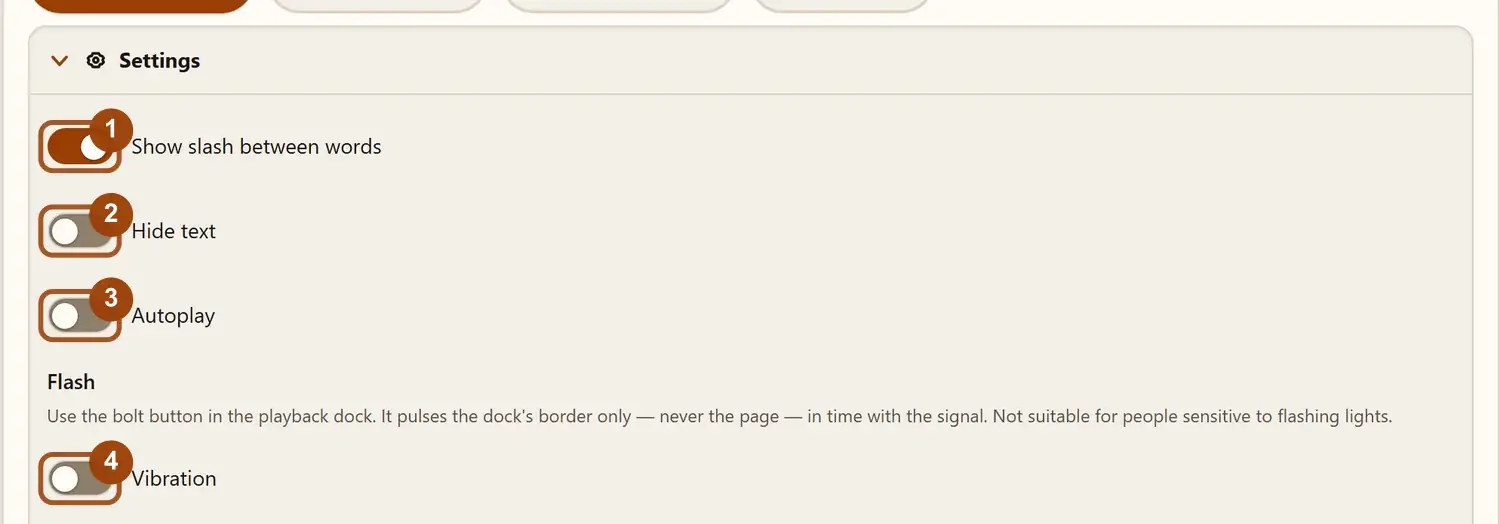
There is also a copy button, so you can grab the text or the Morse code immediately. The share button allows you to send your translation straight to people.
Send a Morse Puzzle
Convert your message into a link and send it to someone as a Morse code puzzle solver challenge. It is a fun way to challenge friends, and it works well for games, parties, and classrooms.
Look Up a Letter
If you want to check a letter or a number while translating, just open Reference — a built-in Morse code dictionary. For a printable Morse code chart of the full alphabet, see the alphabet page.
Try a Random Message
When you are not sure what to type? Press the Random or Example button to load a sample from the phrase generator. It is a quick and easy way to practice reading Morse, test your speed, or see how the tool works.
Clear
To start a new translation, tap the clear option and both of your boxes will be clear.
Download as Audio
You can also save your Morse code as a WAV audio file by clicking on the Download WAV button to keep for later or share anywhere.
Export TXT
If you want to save your Morse code as a text file, then tap on the Export TXT option.
Live Counters
Below each box, you can see how many characters you typed and how many signals it makes, updated as you type. This helps you check message length and see how many dots and dashes a sentence needs.
Simple, Free, and Unlimited
The design is clean, simple and easy to follow, so you always know what to do next. There is no sign-up, no subscription, and no limit on how much you can translate.
When to Use This Morse Code Translator
- Learning Morse by Hearing. Just type a short word, tap play and listen to the rhythm. Start slow and build up by using the speed and Farnsworth settings.
- Practice Ham radio. Enter common phrases, set the playback speed to the level you want to train at, and listen before you go on the air.
- School projects and science fairs. Translate a message, copy the dots and dashes into your report, or save the sound by clicking on Download WAV for your presentation.
- Names and meaningful words for jewelry or tattoos. Make a name, date, or short phrase into dots and dashes for a bracelet or ring. Before finalizing, translate it back to text and play the audio to confirm every letter is right.
- Puzzles, games and escape rooms. Decode a clue you found, or write your own and send it to a friend as a puzzle link.
- Learning the SOS signal.
Practice the pattern
... --- ...with sound and light so you can recognize it. In a real emergency, contact emergency services first, since Morse is not a replacement for calling for help.
Stop Memorizing, Start Spotting Patterns
You do not need to learn 26 random symbols. Most Morse code letters follow a particular pattern, and once you learn and see them, the code gets much easier.
Start with the shortest letters
E is one dot (.). T is one dash (-).
E is the most common letter in English, so it has the shortest code. The code’s early designer, Alfred Vail, is said to have counted letters in a printer’s type cases to decide this.
Learn these two first, because they teach you the difference between short and long.
Use your ears, not just your eyes
Try to say the sounds out loud: a dot is “dit” and a dash is “dah”.
Dot-heavy letters like S (...) and H (....) sound like
a fast tapping. Hear one and the other becomes easy.
Experienced instructors suggest learning by sound, because counting dots and dashes in your head slows you down later.
Learn letters in opposite pairs
Many letters are exact opposites (dots become dashes and dashes become dots). Try to learn them together; this way you can save your time:
- E
.and T- - I
..and M-- - A
.-and N-. - S
...and O--- - U
..-and G--. - R
.-.and K-.- - W
.--and D-..
Learn numbers with one simple rule
Every number is exactly five signals long.
-
1 to 5: start with as many dots as the number, then fill the rest with dashes. 1 is
.----, 3 is...--, and 5 is..... -
6 to 9: start with (number minus 5) dashes, then fill the rest with dots. 6 is
-...., 8 is---.. - 0 is five dashes:
-----
Try the decision tree (visual learners)
Imagine a tree in your mind where a dot takes you left and a dash takes you right. Each step adds one signal, and every letter sits at its own spot.
Some learners find this easier to remember than a plain chart.
Learn slowly and keep it short
Try to add only two or three new letters at a time.
Many learners use the Koch method (full-speed letters, added one at a time) or Farnsworth spacing (fast letters with longer pauses between them). Both aim to build sound recognition instead of counting.
Don’t Skip Punctuation
A message with no punctuation feels unfinished. The three you will use most are:
- Period:
.-.-.- - Comma:
--..-- - Question mark:
..--..
Punctuation codes are longer (six signals each), but they follow simple, repeating patterns that are easy to hear
once you practice. Also useful: send eight dots (........) to mean “I made a mistake,
ignore that.”
Improve Your Morse Code Skills
Once you learn the basics, a few habits can help you get better and faster.
- Get it right before you get fast. Start with slow spacing between letters, but keep each letter at a normal pace. This way you learn the real sound of every letter, and speed comes naturally.
- Practice and work on your weak spots. Always keep a short list of the letters or numbers you often get wrong, and practice those first instead of repeating every letter equally.
- Try a memory trick, but don’t rely on it. A short phrase or picture can help with a tricky letter in the first few days. Some instructors suggest moving on to sound as soon as you can, because the trick adds one extra step between hearing and understanding.
- Move on to common short codes. After words, learn the short signals radio operators use, such as CQ (a call to any station), QTH (my location), and 73 (best regards).
- Make it a game. You can send a Morse puzzle to a friend, decode a random message, or race to beat your own time.
- Learn with others. Ham radio clubs and online learning groups give you feedback, practice partners, and a reason to keep going. Most clubs also run Morse contests, where operators try to make contacts.
Tap along as you listen. With your finger, drum the rhythm on your desk; if you want a dot tap short and if you want a dash press longer. Moving your hand helps the timing stick in your memory.
Try this today: Type any message into the translator, press play and write down what you hear before you look at the result.
Why Morse Code Is Still Around
Morse code has lasted more than 180 years because it asks for very little. Just tap on a table; you don’t need a screen or keyboard to use it. A flashlight, beep or a tap on the table is enough for you, only if the other person knows the code.
The origin of Morse code started with telegraph wires, then moved to radio, and in today’s modern era, you can still find it in ham radio, aviation beacons and mobile keyboards that help disabled people. With time tools changed, but the idea of Morse code remains the same: anyone can learn these simple signals that are sent with careful timing. Radio operators call Morse code “CW,” which means continuous wave.
Where You Will Still Meet Morse Code Today
You can still find Morse code in many places today. Ham radio operators still send Morse as CW, because a simple on-off tone can get through weak or noisy signals where a voice may not. Morse code is also used in many aviation navigation beacons by repeating their name in Morse for confirmation of a pilot’s right station. Without radio, SOS can be sent with a flashlight, a mirror or a tap on metal.
People also type with short and long taps by using their mobile, Google’s Gboard keyboard which has Morse input mode. Morse code is also used in escape rooms and puzzle games. For beginners it is an easy way to convert messages into signals and timings.
Tap Input Mode: Send Morse Code with a Tap
If you want to write Morse code manually, you can switch to the tap input mode. There are three input methods: mouse click, tapping a touch screen or the spacebar on a keyboard.
- Under 200ms tap will register a dot.
- Above 200ms tap will create a dash.
- The letter is auto-decoded after 800ms and appears on the screen.
- Tapping above 2000ms automatically inserts a word space.
- You can also manually click the spacebar button to insert the word break.
Your results are shown visually on screen in the form of dots and dashes in real time. (For example, -.- appears as you tap it, then turns into K), and every decoded letter is added to
the output area below the tap pad.
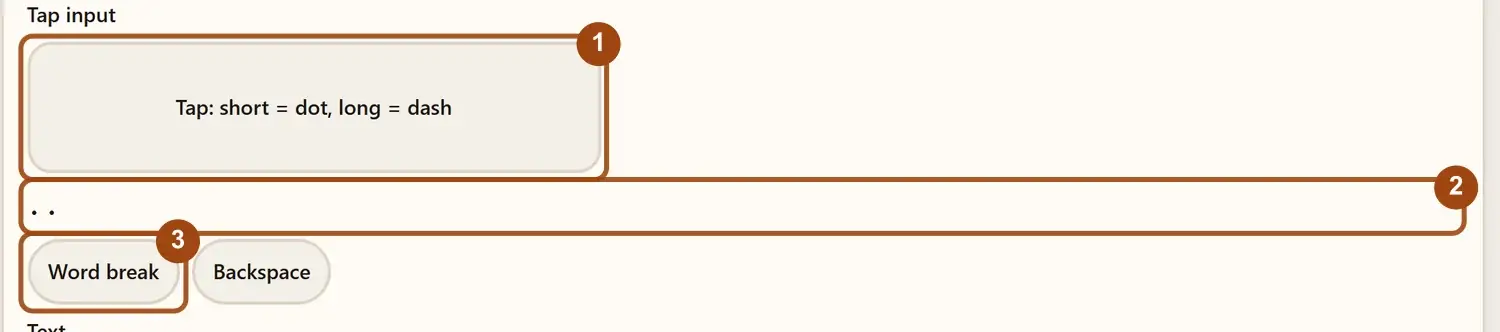
Tap mode is made for learning by doing. You feel the Morse timing instead of just reading about it.
After a few practice rounds, the 200 ms limit starts to feel natural.
If you already know Morse code then you can key in your message with taps, so there is no need to switch to a text keyboard.
The rhythm is close to sending on a straight key, so it is good practice for your timing.
On mobile, you get a small vibration with every tap.
Each decoded letter is added to the output box below the tap pad.
From there, you can play your message as sound, flash it as light, or download it as a WAV file.
Copy, share, and download work the same way as in the other modes.
Common Mistakes When Translating Morse Code
If your result looks wrong, the problem could be in the input. Check these five things first:
- Missing spaces between letters: Each letter needs its own space, or the decoder reads several letters as one.
- Missing word separators: Always use a slash (/) between words, or they will run together.
- Swapped, missing, or extra dots and dashes: One wrong symbol turns a letter into
a different one. For example, S is
..., but drop one dot and it becomes I (..). - Mixed Morse standards: International Morse and American Morse are different. Old telegraph messages may use the older one.
- Unsupported characters: There is no Morse code for emojis and rare symbols, so you can replace them with plain letters.
Tips to Get More Out of the Translator
- During learning, set your speed to 5 (WPM); when you become familiar with letters then increase to 15–20 by just dragging the Speed slider.
- For an authentic CW radio, go to the setting and change Waveform to Square and tone (Hz) to 700.
- If you want to hide input text and just want to read Morse code, just go to the setting and use the Hide Text option.
- If you want Morse to text, just type dots and dashes in your Morse code section. In this way you don’t need to switch modes.
- If you want the experience of light just turn on Flash.
Why Choose Our Morse Code Translator
This Morse code maker works both ways, turns your message into sound, light, or vibration, and updates as you type. It is free, needs no sign-up, and runs as a browser-based web application, so your messages stay on your device. It works for beginners learning their first letters and for anyone who wants a quick, reliable translation.
Difference Between International Morse & American Morse
International Morse Code vs American Morse Code
When people say “Morse code” today, they almost always mean International Morse code. Its older cousin, American Morse code, was built for the first telegraph lines in the United States, and the two are not the same alphabet.
| Feature | International Morse | American Morse |
|---|---|---|
| Built for | Radio, ships, aviation, and ham radio | Landline telegraph wires in the United States |
| Dash length | One standard dash, three times a dot | A shorter dash, plus longer dashes for L and 0 |
| Extra pauses inside a letter | None. The gap between signals inside a letter is always one unit | Some letters (C, O, R, Y, Z) have a longer pause in the middle |
| Still in use? | Yes. It is the worldwide standard (ITU-R M.1677) | Almost never. You mostly meet it in railroad history and reenactments |
| Letter C | -.-. | .. . (a pause before the last dot) |
| Letter L | .-.. | One long dash |
| Letter O | --- | . . (two dots with a pause) |
| Letter R | .-. | . .. (a pause after the first dot) |
Which one should you use?
Use International Morse code. It is the standard for radio, aviation, and learning, and it is the code this translator uses. Radio signals cross borders, so ships and stations needed one shared code, and an international radio conference in London named it for radio messages in 1912. American Morse only matters if you are reading old telegraph records or taking part in railroad history events.
Frequently Asked Questions
What is Morse code?
Morse code is where you can convert your letters and numbers into dots and dashes.
How can I translate Morse code?
To translate Morse code, put dots and dashes into the input field. Your Morse code will be automatically converted into text in the output field.
How can I say HELLO in the Morse code?
.... . .-.. .-.. ---
How can I type normal letters in the Morse code?
Type your letters in the Text box and they are converted to dots and dashes automatically.
What does SOS stand for?
SOS does not officially stand for any words. "Save Our Souls" is a popular explanation added later. In Morse code it is three short signals, three long signals, and three short signals: ... --- ...
How can I learn Morse code?
The best way is to learn it by sound. Listen to short messages with the Play button, start with a few letters, and use a chart only to look a character up.
Is there any tool to convert Morse code?
Yes, there are many tools and apps available to convert Morse code.
What are dots and dashes in Morse code?
Dots ( . ) are short signals and dashes ( - ) are long signals in Morse code.
Can I download Morse code as an audio or send it as a link?
Yes, you can download it by tapping Download WAV, and you can share your Morse code link by tapping Copy share link.
Is Morse code safe to use?
Yes, it's completely safe, without any login. Your translation will happen locally inside the browser.
More Morse tools
- Morse code audio translator
Decode Morse audio from a file or your microphone into text.
- Morse code image translator
Read Morse code from a photo or screenshot.
- Morse code alphabet chart
- Morse code numbers from 0 to 9
- How SOS is sent in Morse code